

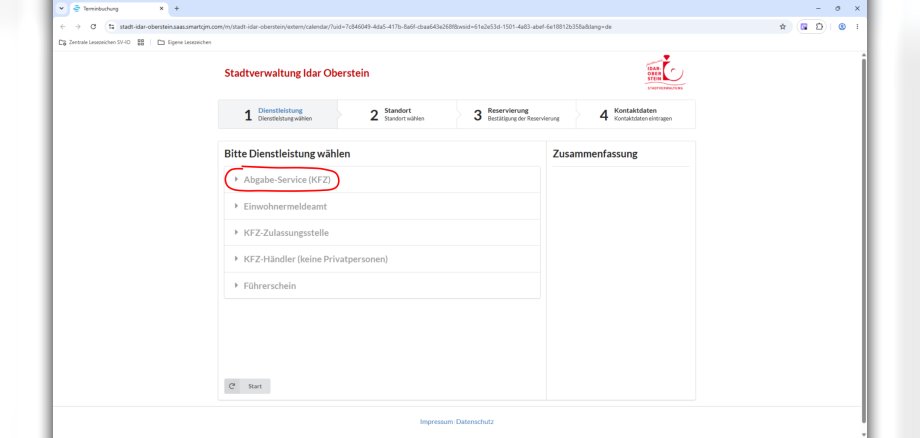
The Idar-Oberstein City Administration’s Citizen Service Office is expanding its range of services effective immediately and will begin testing a new drop-off service for selected standard procedures related to vehicle registration. With this new service, the administration is responding to frequently expressed requests for greater flexibility and easier access to services for everyday matters, such as vehicle de-registration.
An appointment is also required for the drop-off service
Even with the new service, the tried-and-true appointment model will essentially remain in place. Experience over the past few years has shown that fixed appointments lead, in particular, to significantly shorter wait times, more predictable processes, and reliable service. The new drop-off service is now designed to effectively combine both approaches: greater flexibility for simple matters while maintaining orderly and predictable processes.
To this end, an additional slot schedule with ten-minute intervals will be set up every weekday between 7:15 a.m. and 9:00 a.m. Appointments are made available on a weekly basis and can be booked online via the city’s website at www.idar-oberstein.de. During these short appointments, residents can submit documents for specific, straightforward matters. These will then be processed in the back office; there is no immediate on-site processing. Once processing is complete, residents will receive a notification and can pick up the processed documents. The goal is a processing time of generally two business days. The following also applies to these short appointments: If the matter has been resolved in the meantime, the city administration asks that you cancel the appointment in a timely manner so that it remains available to other residents.
This service is intended exclusively for standard procedures in the area of vehicle registration that do not require any special review. For more complex matters or procedures that require consultation, it is still necessary to schedule a regular appointment. The new service will initially run as a pilot project through December 31, 2026. During this period, demand, processing times, and organizational procedures will be evaluated. A decision will then be made as to whether—and in what form—the service will be continued on a permanent basis. The city administration views the new service as another step toward a modern and citizen-oriented administration.