

This page was automatically translated using artificial intelligence. As a result, the text may contain discrepancies or inaccuracies. Only the original version is binding. No legal claims arising from the content of the translated version will be accepted.

Glasses Without Borders

Eyeglasses are often viewed “merely” as a visual aid. But they also play a major role in global educational equity. After all, if a child cannot see what is written on the blackboard, access to knowledge is simply blocked. Thus, a pair of glasses in good condition—which might otherwise lie unused in a drawer—can open up new opportunities for someone else—in learning, in their professional life, and in everyday life. For this reason, the Birkenfeld district and the city of Idar-Oberstein support the “Glasses Without Borders” initiative.

The initiative collects used eyeglasses and ensures that suitable vision aids are put to good use. This provides support to people for whom access to appropriate vision aids would otherwise often be difficult or impossible. For this reason, local governments would like to help raise awareness of this valuable initiative in our region and encourage as many residents as possible to get involved.

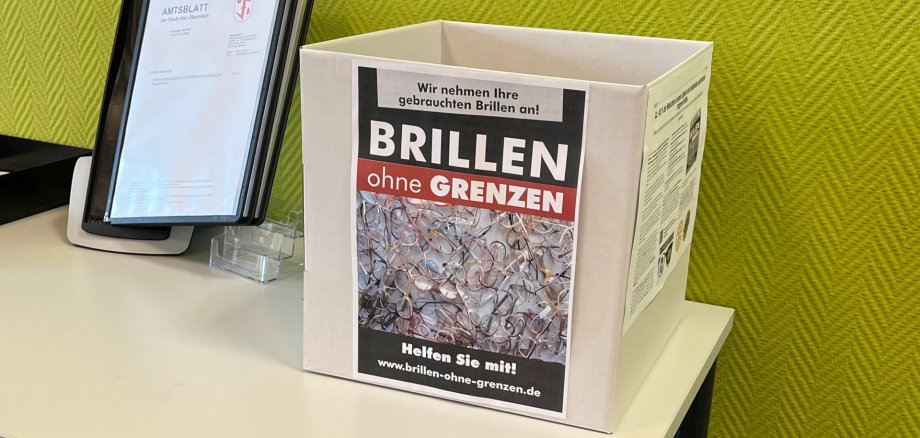
To this end, the district administration has set up collection boxes for used eyeglasses. One of them is prominently displayed in the lobby of the Idar-Oberstein City Hall. A sign explains the initiative and is intended to remind visitors that they can easily drop off any eyeglasses they no longer need at home into the collection box. The collection box thus offers a simple and accessible way to participate, while also serving as a reminder that even glasses that are no longer in use can still be valuable.

In particular, the drive collects used prescription eyeglasses, children’s eyeglasses, reading glasses, and suitable sunglasses. The campaign combines two important goals: it provides tangible help to people while also contributing to the sensible reuse of existing resources. A pair of glasses that is no longer needed here can provide real value elsewhere.

  • For more information about the initiative, visit www.brillen-ohne-grenzen.de.

Help with accessibility

  • General

    We make every effort to ensure that our websites are accessible. You can find details on this in our accessibility statement. You can send us suggestions for improvement using our feedback form.

  • Font size

    To adjust the font size, please use the following key combinations:

    Larger

    ⌘command
    +

    Smaller

    ⌘command
    –

    Larger

    Ctrl
    +

    Smaller

    Ctrl
    –
  • Keyboard navigation

    Use TAB and SHIFT + TAB to navigate through next/previous links, form elements and buttons.

    Use ENTER to open links and interact with elements.

  • Contrast mode

    Press the following key combination to reduce or increase the contrast:

    Enlarge

    ⌃control
    ⌥option
    ⌘command
    .

    Decrease

    ⌃control
    ⌥option
    ⌘command
    ,
    Note: The shortcuts must be activated in the system settings of the operating system.

    Press the left ALT key + left SHIFT key + PRINT to quickly switch the high contrast mode on or off.

  • Invert colors

    Press the following key combination to switch the color inversion on and off:

    ⌃control
    ⌥option
    ⌘command
    8
    Note: The shortcuts must be activated in the system settings of the operating system.

    First activate the screen magnifier and then switch the color inversion on and off with the following key combinations:

    1. screen magnifier

    +

    2. invert colors

    Ctrl
    Old
    I
  • Screen magnifier

    Press the following key combinations to use the screen magnifier:

    Switch on/off

    ⌥option
    ⌘command
    8

    Enlarge view

    ⌥option
    ⌘command
    =

    Reduce view

    ⌥option
    ⌘command
    –
    Note: The shortcuts must be activated in the system settings of the operating system.

    Switch on / Enlarge view

    +

    Reduce view

    –

Select language