

This page has been automatically translated. As a result, there may be discrepancies or inaccuracies in the text. Only the original version is binding. Legal claims arising from the content of the translated version are excluded.

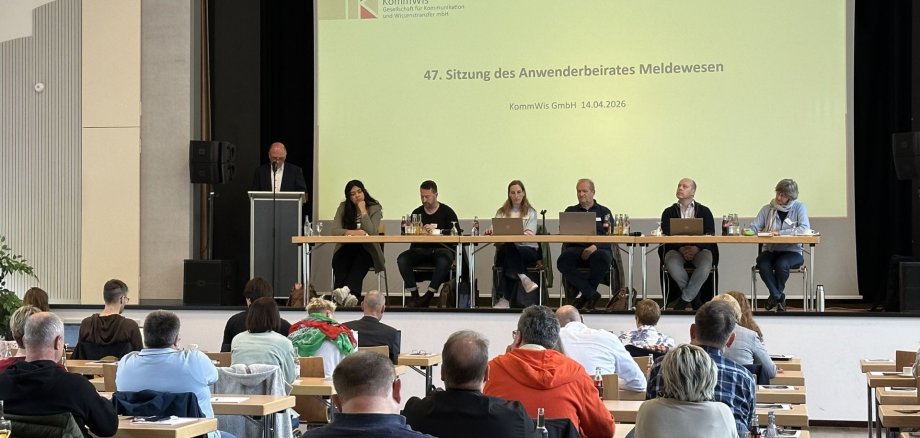
Network meeting on the topic of reporting

The User Advisory Council is an important mouthpiece for the local registration authorities, pooling practical experience from day-to-day work on site and contributing this expertise to the further development of the procedures. It is important that technical solutions not only work, but that they also meet the actual requirements of the administrations and make the work of local employees as efficient as possible.

The meetings are organized by KommWis, an IT service company that provides support for uniform state IT procedures for the municipal administrations of the state of Rhineland-Palatinate. The importance of reliable, secure and efficient IT procedures is particularly evident in the area of registration. Citizens rightly expect that their requests can be processed quickly and correctly.

In his welcoming address, Mayor Friedrich Marx pointed out "how important the exchange that takes place at these meetings is". "In addition to the technical and legal aspects of the registration system, the meetings are also about getting to know colleagues from other administrations and exchanging methods. This dialog not only strengthens the quality of the procedures, but also the cooperation between the municipalities," continued the mayor.

In addition to the exchange of experiences between employees, the Ministry of the Interior also provided important information on current legislation and upcoming legal changes that are relevant for the registration authorities. The Supervisory and Service Directorate was also on site to answer questions and provide suggestions.

The software provider, HSH Soft- und Hardware Vertriebs GmbH, was also available for questions and suggestions from the employees present and presented upcoming changes and innovations in the program.

Help with accessibility

  • General

    We make every effort to ensure that our websites are accessible. You can find details on this in our accessibility statement. You can send us suggestions for improvement using our feedback form.

  • Font size

    To adjust the font size, please use the following key combinations:

    Larger

    ⌘command
    +

    Smaller

    ⌘command

    Larger

    Ctrl
    +

    Smaller

    Ctrl
  • Keyboard navigation

    Use TAB and SHIFT + TAB to navigate through next/previous links, form elements and buttons.

    Use ENTER to open links and interact with elements.

  • Contrast mode

    Press the following key combination to reduce or increase the contrast:

    Enlarge

    ⌃control
    ⌥option
    ⌘command
    .

    Decrease

    ⌃control
    ⌥option
    ⌘command
    ,
    Note: The shortcuts must be activated in the system settings of the operating system.

    Press the left ALT key + left SHIFT key + PRINT to quickly switch the high contrast mode on or off.

  • Invert colors

    Press the following key combination to switch the color inversion on and off:

    ⌃control
    ⌥option
    ⌘command
    8
    Note: The shortcuts must be activated in the system settings of the operating system.

    First activate the screen magnifier and then switch the color inversion on and off with the following key combinations:

    1. screen magnifier

    +

    2. invert colors

    Ctrl
    Old
    I
  • Screen magnifier

    Press the following key combinations to use the screen magnifier:

    Switch on/off

    ⌥option
    ⌘command
    8

    Enlarge view

    ⌥option
    ⌘command
    =

    Reduce view

    ⌥option
    ⌘command
    Note: The shortcuts must be activated in the system settings of the operating system.

    Switch on / Enlarge view

    +

    Reduce view

Select language