

Elections
Upcoming elections
- Rhineland-Palatinate state election: Sunday, 22.03.2026
State election 2026
On Sunday, March 22, 2026, the election to the 19th state parliament of Rhineland-Palatinate will take place. In Idar-Oberstein, around 21,500 eligible voters will be called upon to cast their votes. To enable them to reach the polling stations on foot, a total of 23 polling stations will be set up in the city area. There will also be 7 postal voting boards at the Idar-Oberstein exhibition center.
Voting at the polling station
Polling stations will be open on Sunday, March 22, 2026, from 8:00 to 18:00. The polling station where eligible voters can cast their vote can be found on the polling card.
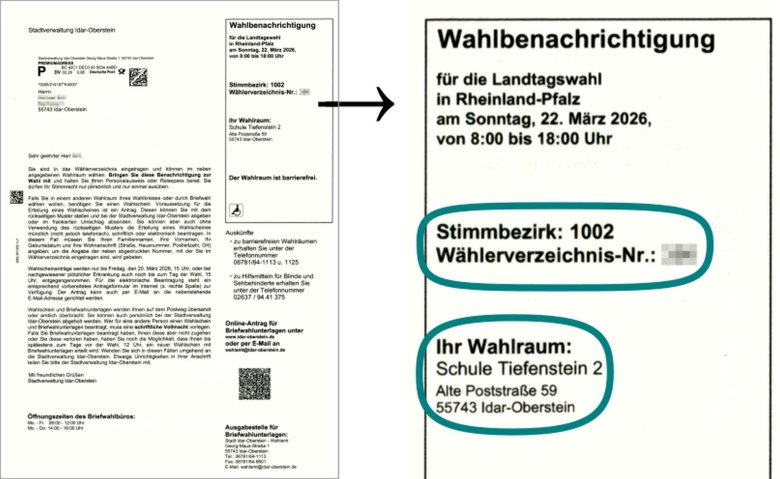
Information on postal voting
In the state election, citizens can cast their vote at the polling station on election day or beforehand by postal vote. The following options are available for applying for postal voting documents:
Voters can cast their vote in advance by postal vote. However, due to the postal delivery times for both sending postal voting documents and returning ballot papers, postal voting documents should be collected from or returned to the administration in person with immediate effect. If postal voting documents have been requested and not delivered, this must be reported to the electoral office by 12 noon on Saturday, March 21, 2026 at the latest, otherwise those affected will not be able to vote. The following options are available for applying for postal voting documents:
- Application and voting in the postal voting office: The postal voting office of the Idar-Oberstein municipal administration is located at Georg-Maus-Straße 2, room II.004 (glass box). It is open from Monday to Friday from 8 am to 12 noon and from Monday to Thursday from 2 pm to 4 pm. On Friday, March 20, 2026, the postal voting office will be open until 3 pm. Postal voting documents can be requested here in person, and it is also possible to vote on site. The acceptance of postal voting documents for other persons requires a corresponding power of attorney. This is the last opportunity to apply for postal voting!
- In principle, the application can still be made using the form on the election notification or by email: There is a personalized application for postal voting documents for each eligible voter on the back of the election notification. It is also possible to send an application by email to briefwahl@idar-oberstein.de. The applicant's first name, surname, address and date of birth must be stated in the e-mail. It is not possible to apply for postal voting documents by telephone!
However, due to the postal delivery times already mentioned at the beginning, both the submission of the form and the collection and return of postal voting documents should take place in person with immediate effect
- If you have any further questions, please contact the electoral office on 06781/64-1113 or send an e-mail to wahlamt@idar-oberstein.de.
Announcements
Past elections
Europe
The European election took place on 09.06.2024. Results of the European election for the state of Rhineland-Palatinate, the district of Birkenfeld and the city of Idar-Oberstein can be found on the website of the state returning officer at www.wahlen.rlp.de/europawahl/ergebnisse.
Bundestag
The election to the 21st German Bundestag took place on 23.02.2025.
Further results of the federal election for the state of Rhineland-Palatinate can be found on the website of the state returning officer at www.wahlen.rlp.de/bundestagswahl/ergebnisse.
State Parliament Rhineland-Palatinate
The election to the 18th state parliament took place on 14.03.2021.
Further results of the state election can be found on the website of the state returning officer atwww.wahlen.rlp.de/kommunalwahlen/ergebnisse
City Council
The local elections in Rhineland-Palatinate took place on 09.06.2024.
Distribution of seats on Idar-Oberstein City Council 2024 - 2029:
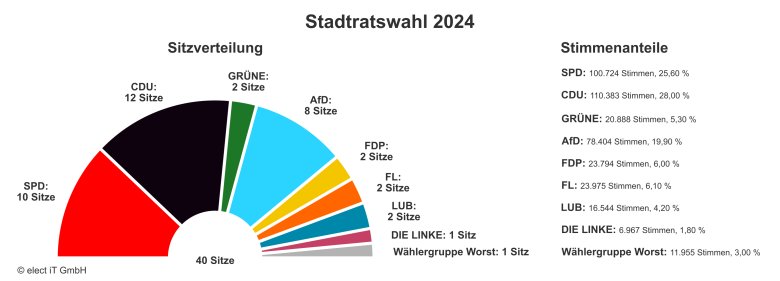 © elect IT GmbH
Further results can be found on the website of the state election administrator at https://www.rlp-wahlen.de/M198/SR_Wahl/. Further information on the City Council, its members and its committees can be found in the council and citizen information system.
District Administrator
On Sunday, October 15, 2023, the run-off election for District Administrator of the Birkenfeld district took place. The overall result can be found on the Birkenfeld district administration website at https://www.landkreis-birkenfeld.de.
Lord Mayor
The election for Lord Mayor of the city of Idar-Oberstein took place on 26.06.2022. The only candidate was incumbent Frank Frühauf. He was elected with 88.1% of the valid votes cast. His second term of office begins on 01.03.2023.
Advisory Board for Migration and Integration
The election for the Advisory Board for Migration and Integration (BMI) of the city of Idar-Oberstein took place on 10.11.2024.