

This page was automatically translated using artificial intelligence. As a result, the text may contain discrepancies or inaccuracies. Only the original version is binding. No legal claims arising from the content of the translated version will be accepted.

Wild Boars in Search of Food:
City Appeals to Cemetery Visitors

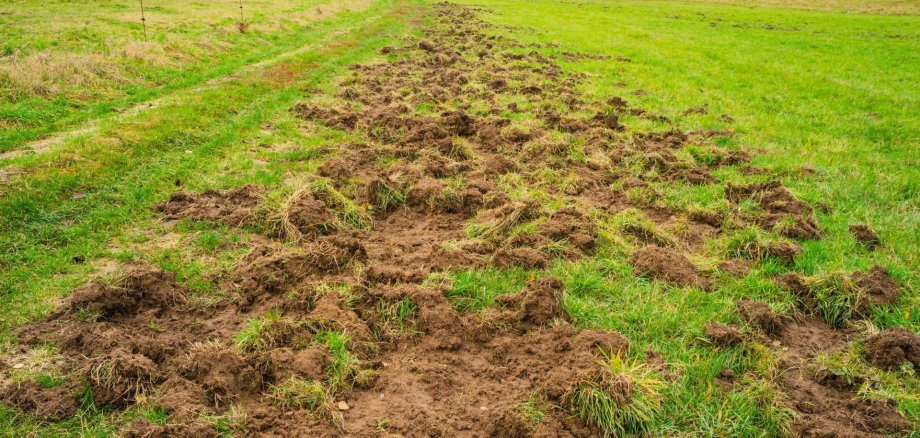
In Idar-Oberstein, there is currently a renewed increase in problems caused by wild boars, which are venturing into built-up areas and causing damage there. The Algenrodt Cemetery has also been affected once again. Due to the prolonged heat and low rainfall, oak and beech trees are expected to produce significantly fewer acorns and beechnuts this year than in previous years. As a result, wild boars are likely to have less natural food available. Particularly in the fall and winter, this could lead the animals to venture more frequently into populated areas in search of alternative food sources.

The Algenrodt Cemetery had already suffered extensive damage from wildlife in the past. To prevent further damage, the city administration had a sturdy fence system installed in May of this year. The existing damage caused by wildlife was then completely repaired.

Last week, several wild boars were once again spotted in the cemetery. At the same time, damage caused by the animals was observed once more. During an inspection, the public works department discovered that one of the gates was open. The wild boars were able to enter the cemetery grounds through this gate. As a result, even the newly installed fence was unable to fulfill its protective function.

The city administration therefore urgently appeals to all visitors to make sure the cemetery gates are fully closed after each time they pass through. Only when the gates are closed can we prevent wild boars from re-entering the grounds and causing further damage. As a temporary measure, the upper gate of the Algenrodt Cemetery has been locked until further notice. Access to the cemetery is currently possible only through the lower gate at the funeral hall.

The city administration asks for your understanding regarding this restriction and for the cooperation of all cemetery visitors. By consistently closing the gates, each individual can help prevent further damage and ensure the effectiveness of the protective barriers, which were built at great expense.

Help with accessibility

  • General

    We make every effort to ensure that our websites are accessible. You can find details on this in our accessibility statement. You can send us suggestions for improvement using our feedback form.

  • Font size

    To adjust the font size, please use the following key combinations:

    Larger

    ⌘command
    +

    Smaller

    ⌘command

    Larger

    Ctrl
    +

    Smaller

    Ctrl
  • Keyboard navigation

    Use TAB and SHIFT + TAB to navigate through next/previous links, form elements and buttons.

    Use ENTER to open links and interact with elements.

  • Contrast mode

    Press the following key combination to reduce or increase the contrast:

    Enlarge

    ⌃control
    ⌥option
    ⌘command
    .

    Decrease

    ⌃control
    ⌥option
    ⌘command
    ,
    Note: The shortcuts must be activated in the system settings of the operating system.

    Press the left ALT key + left SHIFT key + PRINT to quickly switch the high contrast mode on or off.

  • Invert colors

    Press the following key combination to switch the color inversion on and off:

    ⌃control
    ⌥option
    ⌘command
    8
    Note: The shortcuts must be activated in the system settings of the operating system.

    First activate the screen magnifier and then switch the color inversion on and off with the following key combinations:

    1. screen magnifier

    +

    2. invert colors

    Ctrl
    Old
    I
  • Screen magnifier

    Press the following key combinations to use the screen magnifier:

    Switch on/off

    ⌥option
    ⌘command
    8

    Enlarge view

    ⌥option
    ⌘command
    =

    Reduce view

    ⌥option
    ⌘command
    Note: The shortcuts must be activated in the system settings of the operating system.

    Switch on / Enlarge view

    +

    Reduce view

Select language