This page was automatically translated using artificial intelligence. As a result, the text may contain discrepancies or inaccuracies. Only the original version is binding. No legal claims arising from the content of the translated version will be accepted.

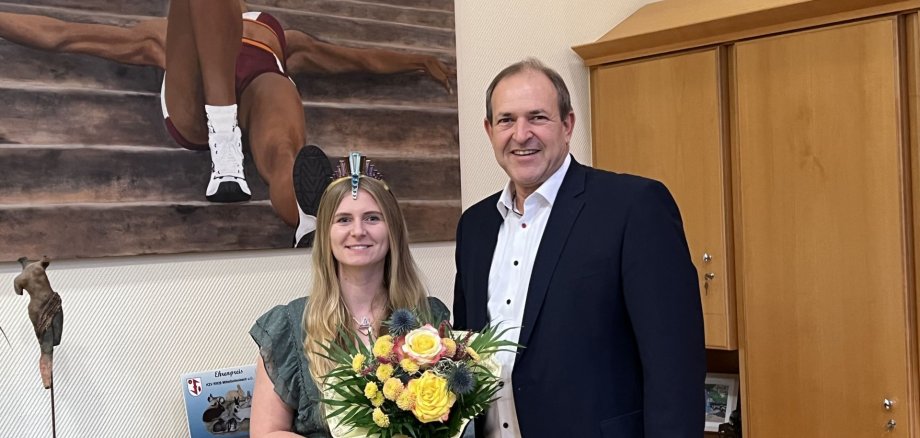
New Gemstone Queen Aline Stanek Visits Mayor Frühauf

Mayor Frank Frühauf welcomed the new queen and her companion, Leonhard Stibitz, chairman of the German Gemstone Route Support Association. “The Gemstone Queen is not only an important representative of our region but also of the gemstone and jewelry industry,” emphasized Mayor Frühauf. The very weekend after her coronation, Aline Stanek traveled to Munich for Gem World, which the mayor also attended. With Aline Stanek, we once again have a Gem Queen in office who comes from the jewelry and gemstone industry. In addition to her duties as a brand ambassador, she also used the trade show in Munich to purchase gemstones for her upcoming creations.

“The first few weeks as Gemstone Queen were exciting, but also very enjoyable,” said Aline Stanek. Immediately after the coronation, there was also the traditional visit with a live broadcast at Antenne Bad Kreuznach, and in the coming weeks, there are more interesting events on the schedule, such as the mineral fair in Hamburg and the Advent concert at the Mörschied Open-Air Theater. Of central importance is the close collaboration between the Gemstone Queen, as a brand ambassador, and the EdelSteinLand Tourist Information Office to promote the gemstone and national park region locally, regionally, and worldwide.

Help with accessibility

  • General

    We make every effort to ensure that our websites are accessible. You can find details on this in our accessibility statement. You can send us suggestions for improvement using our feedback form.

  • Font size

    To adjust the font size, please use the following key combinations:

    Larger

    ⌘command
    +

    Smaller

    ⌘command
    –

    Larger

    Ctrl
    +

    Smaller

    Ctrl
    –
  • Keyboard navigation

    Use TAB and SHIFT + TAB to navigate through next/previous links, form elements and buttons.

    Use ENTER to open links and interact with elements.

  • Contrast mode

    Press the following key combination to reduce or increase the contrast:

    Enlarge

    ⌃control
    ⌥option
    ⌘command
    .

    Decrease

    ⌃control
    ⌥option
    ⌘command
    ,
    Note: The shortcuts must be activated in the system settings of the operating system.

    Press the left ALT key + left SHIFT key + PRINT to quickly switch the high contrast mode on or off.

  • Invert colors

    Press the following key combination to switch the color inversion on and off:

    ⌃control
    ⌥option
    ⌘command
    8
    Note: The shortcuts must be activated in the system settings of the operating system.

    First activate the screen magnifier and then switch the color inversion on and off with the following key combinations:

    1. screen magnifier

    +

    2. invert colors

    Ctrl
    Old
    I
  • Screen magnifier

    Press the following key combinations to use the screen magnifier:

    Switch on/off

    ⌥option
    ⌘command
    8

    Enlarge view

    ⌥option
    ⌘command
    =

    Reduce view

    ⌥option
    ⌘command
    –
    Note: The shortcuts must be activated in the system settings of the operating system.

    Switch on / Enlarge view

    +

    Reduce view

    –

Select language