

This page was automatically translated using artificial intelligence. As a result, the text may contain discrepancies or inaccuracies. Only the original version is binding. No legal claims arising from the content of the translated version will be accepted.

For Greater Unity

Loneliness is widespread in our society. It can affect anyone, regardless of age or life circumstances. This makes places that bring people together all the more important. Libraries are exactly those kinds of places: You can visit them time and again, meet people, have conversations, and feel like you belong—all without any pressure to buy anything.
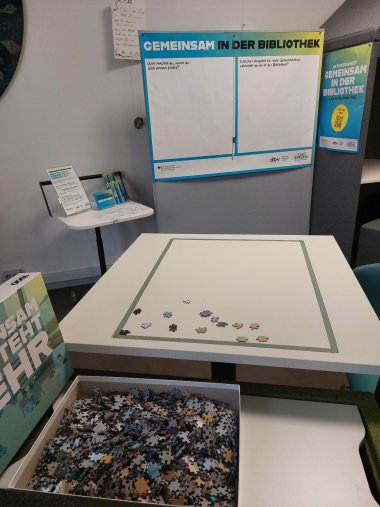
The photo shows the event area in the city library.
City administration of Idar-Oberstein

The German Library Association (dbv) and the Federal Ministry of Education, Family Affairs, Senior Citizens, Women, and Youth (BMBFSFJ) are therefore calling for participation in the nationwide campaign month “Together at the Library” from November 1 through 30, 2026. With their diverse offerings for creativity, continuing education, and networking, libraries serve as hubs for people from all walks of life. They are open, safe, and consumption-free spaces—places where we can come together to combat loneliness.

The Idar-Oberstein City Library is also participating in the campaign with a creative space. There, visitors can help put together a large collaborative puzzle, and there are coloring pages for children. In addition, everyone can write on a large poster what they do when they feel lonely and what other activities they’d like to see at their library to foster a greater sense of community.

  • For more information about the campaign month and the hands-on activity, visit www.gemeinsam-in-der-bibliothek.de. The Idar-Oberstein City Library, located at Hauptstraße 373a, is open Mondays and Thursdays from 10 a.m. to 2 p.m. and from 3 p.m. to 6 p.m., as well as Wednesdays and Fridays from 12 p.m. to 5 p.m. For more information, visit www.idar-oberstein.de/buch.

Help with accessibility

  • General

    We make every effort to ensure that our websites are accessible. You can find details on this in our accessibility statement. You can send us suggestions for improvement using our feedback form.

  • Font size

    To adjust the font size, please use the following key combinations:

    Larger

    ⌘command
    +

    Smaller

    ⌘command
    –

    Larger

    Ctrl
    +

    Smaller

    Ctrl
    –
  • Keyboard navigation

    Use TAB and SHIFT + TAB to navigate through next/previous links, form elements and buttons.

    Use ENTER to open links and interact with elements.

  • Contrast mode

    Press the following key combination to reduce or increase the contrast:

    Enlarge

    ⌃control
    ⌥option
    ⌘command
    .

    Decrease

    ⌃control
    ⌥option
    ⌘command
    ,
    Note: The shortcuts must be activated in the system settings of the operating system.

    Press the left ALT key + left SHIFT key + PRINT to quickly switch the high contrast mode on or off.

  • Invert colors

    Press the following key combination to switch the color inversion on and off:

    ⌃control
    ⌥option
    ⌘command
    8
    Note: The shortcuts must be activated in the system settings of the operating system.

    First activate the screen magnifier and then switch the color inversion on and off with the following key combinations:

    1. screen magnifier

    +

    2. invert colors

    Ctrl
    Old
    I
  • Screen magnifier

    Press the following key combinations to use the screen magnifier:

    Switch on/off

    ⌥option
    ⌘command
    8

    Enlarge view

    ⌥option
    ⌘command
    =

    Reduce view

    ⌥option
    ⌘command
    –
    Note: The shortcuts must be activated in the system settings of the operating system.

    Switch on / Enlarge view

    +

    Reduce view

    –

Select language