

This page has been automatically translated. As a result, there may be discrepancies or inaccuracies in the text. Only the original version is binding. Legal claims arising from the content of the translated version are excluded.

The bike lane on Tiefensteiner Straße will continue

Residents along the affected section are asked to refrain from parking their vehicles on the roadway starting July 19, 2026, so that the road marking work can be carried out without disruption.

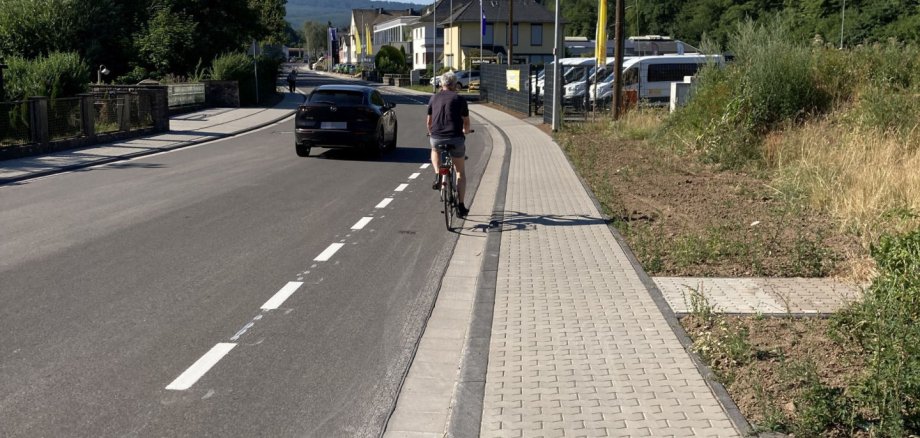
The installation of the bicycle safety lane is part of the mobility plan for Idar-Oberstein adopted by the City Council. Following the completion of the first phase of the Tiefensteiner Straße renovation, the safety lane has already been marked in the section under construction, from the Weiherschleife to the Grimm Senior Living Center. Work is now continuing on the markings; the protected bike lane is being constructed with a width of 1.50 meters, in accordance with the recommendations for bicycle infrastructure.

Impact on Road Traffic and Parking

Cyclists have the right of way on the bike lane. Other vehicles may use it only in exceptional cases, such as to avoid oncoming trucks or buses. However, this must not endanger or obstruct bicycle traffic.

In addition, there is a strict no-parking and no-stopping zone on the bike lane; therefore, parallel parking on the roadway in the direction of Kirschweiler between Weiherschleife and the Bachweg intersection will no longer be permitted. To ensure the necessary roadway width, changes are also necessary on the opposite lane in the direction of Idar. In the area between the upper junction with Alte Poststraße (across from the Bachweg junction) and the Weiherschleife, curbside parking will be eliminated and a restricted no-stopping zone will be established. Traffic signage will be adjusted accordingly as part of the road marking work.

The city administration asks residents and road users for their understanding regarding these measures.

Help with accessibility

  • General

    We make every effort to ensure that our websites are accessible. You can find details on this in our accessibility statement. You can send us suggestions for improvement using our feedback form.

  • Font size

    To adjust the font size, please use the following key combinations:

    Larger

    ⌘command
    +

    Smaller

    ⌘command

    Larger

    Ctrl
    +

    Smaller

    Ctrl
  • Keyboard navigation

    Use TAB and SHIFT + TAB to navigate through next/previous links, form elements and buttons.

    Use ENTER to open links and interact with elements.

  • Contrast mode

    Press the following key combination to reduce or increase the contrast:

    Enlarge

    ⌃control
    ⌥option
    ⌘command
    .

    Decrease

    ⌃control
    ⌥option
    ⌘command
    ,
    Note: The shortcuts must be activated in the system settings of the operating system.

    Press the left ALT key + left SHIFT key + PRINT to quickly switch the high contrast mode on or off.

  • Invert colors

    Press the following key combination to switch the color inversion on and off:

    ⌃control
    ⌥option
    ⌘command
    8
    Note: The shortcuts must be activated in the system settings of the operating system.

    First activate the screen magnifier and then switch the color inversion on and off with the following key combinations:

    1. screen magnifier

    +

    2. invert colors

    Ctrl
    Old
    I
  • Screen magnifier

    Press the following key combinations to use the screen magnifier:

    Switch on/off

    ⌥option
    ⌘command
    8

    Enlarge view

    ⌥option
    ⌘command
    =

    Reduce view

    ⌥option
    ⌘command
    Note: The shortcuts must be activated in the system settings of the operating system.

    Switch on / Enlarge view

    +

    Reduce view

Select language