

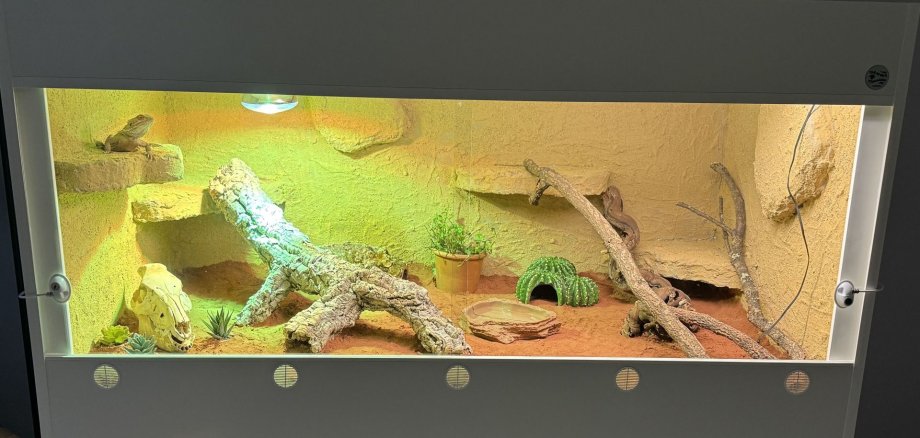
The little reptile is named Spike and, ever since he arrived, has been drawing curious glances, leading to exciting discoveries, and providing plenty to talk about. Before Spike could move into his new home, however, the children had quite a bit to do. Together with their teachers, they set out on an exciting journey of discovery into the world of bearded dragons. Along the way, they learned where the animals come from, how they live in their natural habitat, and what kind of food they need. The question of what conditions are important for species-appropriate care also played a major role.
But it wasn’t just knowledge that was needed: With plenty of creativity and team spirit, the children helped design the back wall of the terrarium and set up the new home for their animal roommate. This allowed them to actively participate in the preparations and experience how many small contributions come together to create a shared project. When the terrarium was finally finished and the bearded dragon was ready to move in, there was just one important decision left to make: the name. The children offered various suggestions and then voted together. The result was clear—the new pet is named Spike!
Ever since he moved in, the children have been watching their little roommate in amazement every day. Full of pride and care, the children now work together every day to ensure the well-being of their scaly friend and are learning that animals need special attention, consideration, and proper care.
A project that was only possible through collaboration
A project like this can only be realized with strong partners by our side. The Göttschied Daycare Center would like to express its heartfelt thanks to all the donors and volunteers who made this experience possible for the children: The company “TakaTuka Terrarien,” owned by Benjamin Lynn, for the generous donation of the terrarium; the company “Dohse Aquaristik GmbH & Co. KG,” and especially Sebastian Bicker for the fantastic equipment and setup of the terrarium; the Friends of the Göttschied Daycare Center for their active and financial support; and “Kerth Reptiles,” owned by Steven Kerth, for their expert, warm advice and assistance with the purchase of the bearded dragon.
Thanks to this wonderful commitment, the children at the Göttschied daycare center have not only taken a new animal to their hearts, but have also learned how important it is to take on responsibility and experience a sense of community.