

This page was automatically translated using artificial intelligence. As a result, the text may contain discrepancies or inaccuracies. Only the original version is binding. No legal claims arising from the content of the translated version will be accepted.

Fully Digital Volunteer Card

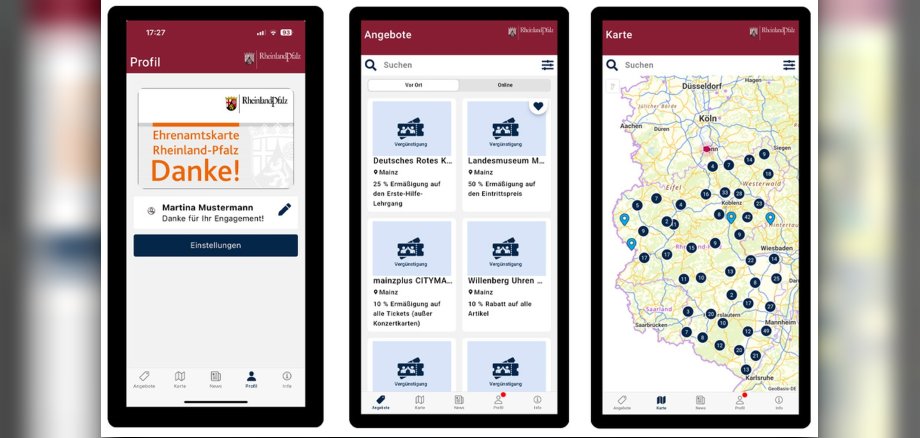
Marcus Klein, Minister for Federal and European Affairs, Sports, Volunteer Work, and Media, and Head of the State Chancellery, officially unveiled and launched the new app for the Rhineland-Palatinate statewide volunteer card. The app makes it possible for the first time to apply for the Volunteer Card entirely online and makes it easier to find and take advantage of discounts throughout the state.

The minister emphasized: “About 1.4 million people in Rhineland-Palatinate volunteer; this dedication is invaluable and deserves the highest recognition. The statewide Volunteer Card is the state government’s central expression of appreciation for this commitment. With the app, we’re making it even easier to apply for the card and enjoy its benefits. We want the Volunteer Card to be accessible to everyone, whether young or old, in the city or in rural areas. The app is a major step in this direction. And we’re continuing to work to ensure that the card opens more and more doors.”

With the new app, Rhineland-Palatinate is adopting a solution that the state of North Rhine-Westphalia developed and has already successfully implemented as part of the Online Access Act. Nine federal states are already using the app. In the future, the entire application process will also be conducted digitally: Volunteers fill out the application in the app, organizations confirm it digitally, municipalities review and approve it, and the State Coordination Office for Volunteering and Democracy finalizes the process. This significantly speeds up the process and saves time for everyone involved. In addition, the state government is taking targeted steps to enhance the appeal of the Volunteer Card and is currently preparing for mutual recognition of the card with North Rhine-Westphalia and other neighboring states such as Hesse, Saarland, and Baden-Württemberg.

  • The app is now available in the Google Play Store for Android devices and in the Apple App Store for iOS devices. It’s called “Ehrenamtskarten-App.” For more information on the Rhineland-Palatinate Volunteer Card, visit wir-tun-was.rlp.de or the city’s website at www.idar-oberstein.de/ehrenamtskarte.

Help with accessibility

  • General

    We make every effort to ensure that our websites are accessible. You can find details on this in our accessibility statement. You can send us suggestions for improvement using our feedback form.

  • Font size

    To adjust the font size, please use the following key combinations:

    Larger

    ⌘command
    +

    Smaller

    ⌘command
    –

    Larger

    Ctrl
    +

    Smaller

    Ctrl
    –
  • Keyboard navigation

    Use TAB and SHIFT + TAB to navigate through next/previous links, form elements and buttons.

    Use ENTER to open links and interact with elements.

  • Contrast mode

    Press the following key combination to reduce or increase the contrast:

    Enlarge

    ⌃control
    ⌥option
    ⌘command
    .

    Decrease

    ⌃control
    ⌥option
    ⌘command
    ,
    Note: The shortcuts must be activated in the system settings of the operating system.

    Press the left ALT key + left SHIFT key + PRINT to quickly switch the high contrast mode on or off.

  • Invert colors

    Press the following key combination to switch the color inversion on and off:

    ⌃control
    ⌥option
    ⌘command
    8
    Note: The shortcuts must be activated in the system settings of the operating system.

    First activate the screen magnifier and then switch the color inversion on and off with the following key combinations:

    1. screen magnifier

    +

    2. invert colors

    Ctrl
    Old
    I
  • Screen magnifier

    Press the following key combinations to use the screen magnifier:

    Switch on/off

    ⌥option
    ⌘command
    8

    Enlarge view

    ⌥option
    ⌘command
    =

    Reduce view

    ⌥option
    ⌘command
    –
    Note: The shortcuts must be activated in the system settings of the operating system.

    Switch on / Enlarge view

    +

    Reduce view

    –

Select language