

This page has been automatically translated. As a result, there may be discrepancies or inaccuracies in the text. Only the original version is binding. Legal claims arising from the content of the translated version are excluded.

New fence for the Algenrodt cemetery completed

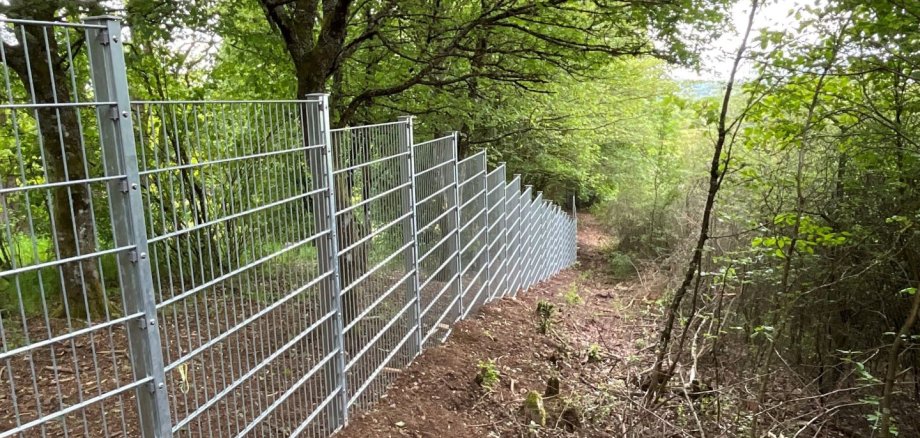
Visitors to the cemetery in Algenrodt can breathe a sigh of relief: the new fencing around the site is now in place. After massive problems with game damage in the past, a modern and robust fence system now protects the resting place from uninvited animal guests.

Focus on protection against wild boar

The newly erected double wire mesh fence extends over a total length of 305 meters and is 1.60 meters high. In order to effectively prevent undermining by wild boars, the hot-dip galvanized construction was installed particularly close to the ground or embedded directly into the ground. The new barrier immediately catches the eye. A new door was also integrated at the rear of the system. This ensures that the fence remains optimally accessible from both sides for future work.

Rapid implementation following decision

The legal basis for the construction project was laid by resolution in December 2025. Thanks to the swift implementation, the project was successfully completed in May 2026. Relatives can now visit the cemetery again without worrying about acute wild boar damage and linger there in peace.

Removal of old damage to start soon

However, the project is not yet complete. As soon as a longer dry period sets in, the municipal building depot will start the follow-up work on the site. The plan includes the comprehensive removal of the remaining wild boar damage in the inner area. The aim of the measures is to restore the cemetery to a dignified and attractive condition in the near future so that it can once again be enjoyed by the public.

Help with accessibility

  • General

    We make every effort to ensure that our websites are accessible. You can find details on this in our accessibility statement. You can send us suggestions for improvement using our feedback form.

  • Font size

    To adjust the font size, please use the following key combinations:

    Larger

    ⌘command
    +

    Smaller

    ⌘command

    Larger

    Ctrl
    +

    Smaller

    Ctrl
  • Keyboard navigation

    Use TAB and SHIFT + TAB to navigate through next/previous links, form elements and buttons.

    Use ENTER to open links and interact with elements.

  • Contrast mode

    Press the following key combination to reduce or increase the contrast:

    Enlarge

    ⌃control
    ⌥option
    ⌘command
    .

    Decrease

    ⌃control
    ⌥option
    ⌘command
    ,
    Note: The shortcuts must be activated in the system settings of the operating system.

    Press the left ALT key + left SHIFT key + PRINT to quickly switch the high contrast mode on or off.

  • Invert colors

    Press the following key combination to switch the color inversion on and off:

    ⌃control
    ⌥option
    ⌘command
    8
    Note: The shortcuts must be activated in the system settings of the operating system.

    First activate the screen magnifier and then switch the color inversion on and off with the following key combinations:

    1. screen magnifier

    +

    2. invert colors

    Ctrl
    Old
    I
  • Screen magnifier

    Press the following key combinations to use the screen magnifier:

    Switch on/off

    ⌥option
    ⌘command
    8

    Enlarge view

    ⌥option
    ⌘command
    =

    Reduce view

    ⌥option
    ⌘command
    Note: The shortcuts must be activated in the system settings of the operating system.

    Switch on / Enlarge view

    +

    Reduce view

Select language