

This page has been automatically translated. As a result, there may be discrepancies or inaccuracies in the text. Only the original version is binding. Legal claims arising from the content of the translated version are excluded.

Rock stabilization work on the Schlossberg

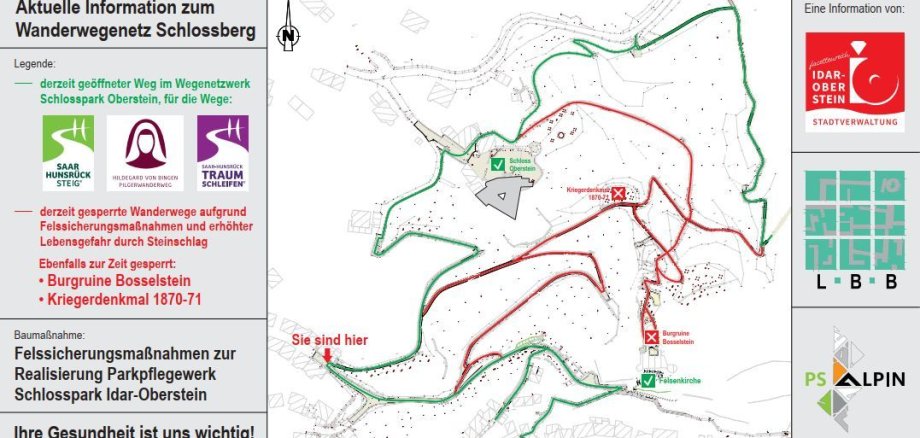
Due to necessary rock stabilization work in the area of the Idar-Oberstein Schlossberg, numerous paths are currently closed. From Wednesday, May 20, 2026, some of the closed paths can be reopened to pedestrian traffic. Among other things, a pedestrian connection from the market square up to Oberstein Castle will then be possible again. The construction work is being carried out in cooperation with the Landesbetrieb Liegenschafts- und Baubetreuung (LBB) Rheinland-Pfalz and is expected to last until October. The overview map shows which paths are open (green) and which paths are closed (red).

These rock stabilization works are also preparatory measures for the park maintenance project, in which the General Directorate for Cultural Heritage (GdKE) plans to awaken the English landscape park, which was built by Grand Duke Nicolaus Friedrich Peter zu Oldenburg in the 19th century, from its slumber. The paths are designed to give visitors to the park a good view of the sights such as Bosselstein Castle and Oberstein New Palace. The aim is to restore the landscape park over the next few years so that it becomes a new tourist highlight of Idar-Oberstein in the immediate vicinity of the Felsenkirche church and the New Oberstein Castle.


Help with accessibility

  • General

    We make every effort to ensure that our websites are accessible. You can find details on this in our accessibility statement. You can send us suggestions for improvement using our feedback form.

  • Font size

    To adjust the font size, please use the following key combinations:

    Larger

    ⌘command
    +

    Smaller

    ⌘command

    Larger

    Ctrl
    +

    Smaller

    Ctrl
  • Keyboard navigation

    Use TAB and SHIFT + TAB to navigate through next/previous links, form elements and buttons.

    Use ENTER to open links and interact with elements.

  • Contrast mode

    Press the following key combination to reduce or increase the contrast:

    Enlarge

    ⌃control
    ⌥option
    ⌘command
    .

    Decrease

    ⌃control
    ⌥option
    ⌘command
    ,
    Note: The shortcuts must be activated in the system settings of the operating system.

    Press the left ALT key + left SHIFT key + PRINT to quickly switch the high contrast mode on or off.

  • Invert colors

    Press the following key combination to switch the color inversion on and off:

    ⌃control
    ⌥option
    ⌘command
    8
    Note: The shortcuts must be activated in the system settings of the operating system.

    First activate the screen magnifier and then switch the color inversion on and off with the following key combinations:

    1. screen magnifier

    +

    2. invert colors

    Ctrl
    Old
    I
  • Screen magnifier

    Press the following key combinations to use the screen magnifier:

    Switch on/off

    ⌥option
    ⌘command
    8

    Enlarge view

    ⌥option
    ⌘command
    =

    Reduce view

    ⌥option
    ⌘command
    Note: The shortcuts must be activated in the system settings of the operating system.

    Switch on / Enlarge view

    +

    Reduce view

Select language