

This page was automatically translated using artificial intelligence. As a result, the text may contain discrepancies or inaccuracies. Only the original version is binding. No legal claims arising from the content of the translated version will be accepted.

The Diamond Kids' Bicycle Tour

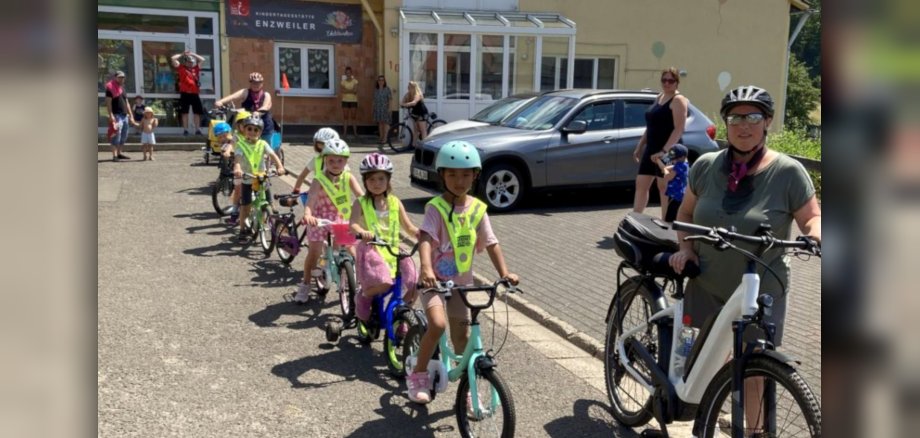
The teachers had collected the children’s ideas about what they would like to do together this year. In addition to regular activities such as visits to the fire department, the police station, or other local field trips, the children wanted, among other things, to go on a bike ride.

To prepare for the tour, traffic safety advisor David Hofmann from the Idar-Oberstein Police Department visited the daycare center with a colleague. In the old schoolyard, the children practiced riding their bikes in traffic. They had to learn the traffic rules, maintain their balance, and sometimes wait patiently—which required a great deal of concentration. At the end, all the “Diamond Kids” received a preschool bicycle license for their bike ride. David Hofmann emphasized that this was the first preschool group with which he had done something so special. He noted that learning the rules early on and knowing how to ride a bike safely in traffic are very important.

On the day of the outing, we set off from the daycare center, heading down the hill toward the Nahe River. It didn’t take long for the first mishap to occur: a pedal had fallen off one of the bikes. But a dad from the daycare center quickly rushed over with tools to help. After the big adventure and a good dip in the Nahe River to cool off, we headed back to the daycare, where the parents were already waiting to have a barbecue with the kids. Afterward, the “Diamantkinder” unpacked their overnight gear and enjoyed another adventurous night at the daycare center. This day was a wonderful way for everyone to wrap up their time at the daycare center.

Help with accessibility

  • General

    We make every effort to ensure that our websites are accessible. You can find details on this in our accessibility statement. You can send us suggestions for improvement using our feedback form.

  • Font size

    To adjust the font size, please use the following key combinations:

    Larger

    ⌘command
    +

    Smaller

    ⌘command

    Larger

    Ctrl
    +

    Smaller

    Ctrl
  • Keyboard navigation

    Use TAB and SHIFT + TAB to navigate through next/previous links, form elements and buttons.

    Use ENTER to open links and interact with elements.

  • Contrast mode

    Press the following key combination to reduce or increase the contrast:

    Enlarge

    ⌃control
    ⌥option
    ⌘command
    .

    Decrease

    ⌃control
    ⌥option
    ⌘command
    ,
    Note: The shortcuts must be activated in the system settings of the operating system.

    Press the left ALT key + left SHIFT key + PRINT to quickly switch the high contrast mode on or off.

  • Invert colors

    Press the following key combination to switch the color inversion on and off:

    ⌃control
    ⌥option
    ⌘command
    8
    Note: The shortcuts must be activated in the system settings of the operating system.

    First activate the screen magnifier and then switch the color inversion on and off with the following key combinations:

    1. screen magnifier

    +

    2. invert colors

    Ctrl
    Old
    I
  • Screen magnifier

    Press the following key combinations to use the screen magnifier:

    Switch on/off

    ⌥option
    ⌘command
    8

    Enlarge view

    ⌥option
    ⌘command
    =

    Reduce view

    ⌥option
    ⌘command
    Note: The shortcuts must be activated in the system settings of the operating system.

    Switch on / Enlarge view

    +

    Reduce view

Select language