This page was automatically translated using artificial intelligence. As a result, the text may contain discrepancies or inaccuracies. Only the original version is binding. No legal claims arising from the content of the translated version will be accepted.

Startup Day 2026

Information event

Category: Information event

Startup Day 2026

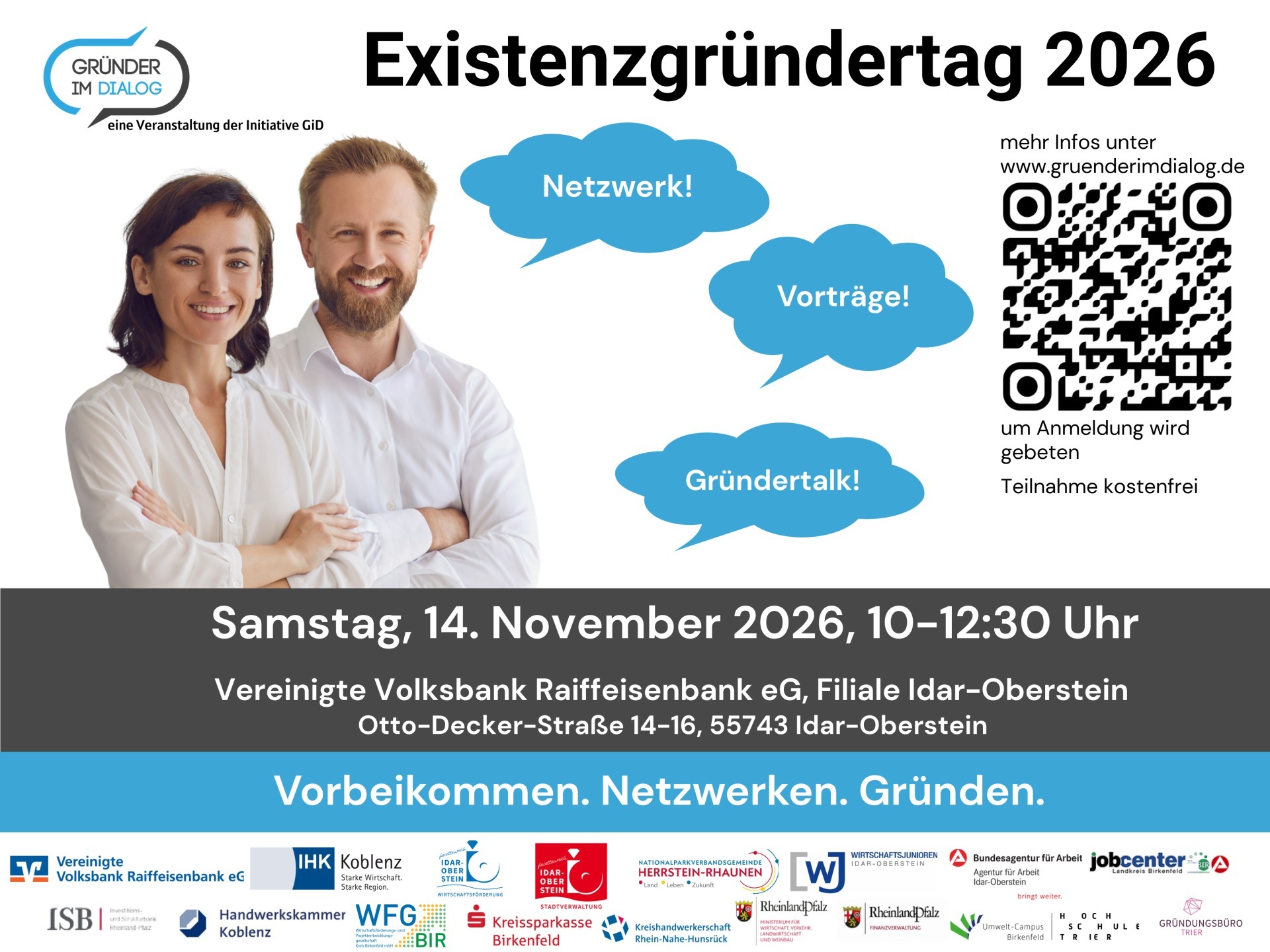
At this year’s Startup Day organized by the “Grüner im Dialog” initiative, visitors can expect a varied program that combines basic knowledge about starting a business with personal, real-world experiences. The event is open to people with initial business ideas, those with concrete plans to start a business, and anyone interested in business succession.

Following the welcome remarks and a brief introduction of the network partners, three concise presentations will be given. Michael Fuhr from the Koblenz Chamber of Crafts will explain, in a presentation titled “Business Plan—The Roadmap to Success,” what matters most when planning to start a business. Next, Janik Füllmann from VVR Bank will discuss necessary insurance coverage. Michael Stieb from the Rhineland-Palatinate Investment and Structural Bank (ISB) will present various options for startup financing through ISB and KfW. Another highlight of the program is the “Startup Talk.” Here, the focus will be on personal experiences, challenges, and success factors on the path to self-employment. To wrap up the event, a get-together with light refreshments and drinks will offer an opportunity to talk with experts, networking partners, and others interested in starting a business, ask questions, and make new connections.

Through the Startup Day, the “Gründer im Dialog” initiative aims to encourage people in the region to further develop their business ideas, take the plunge into self-employment, or consider taking over an existing business. At the same time, the initiative seeks to raise awareness of the wide range of advisory and support services available in the region.

Participation is free, but to help us plan better, we ask that you register in advance. You can do so on the initiative’s website, where you’ll also find the full program and additional information about the event: https://gruenderimdialog.de/#lastevents.


Organizer

"Entrepreneurs in Dialogue" Initiative

Help with accessibility

  • General

    We make every effort to ensure that our websites are accessible. You can find details on this in our accessibility statement. You can send us suggestions for improvement using our feedback form.

  • Font size

    To adjust the font size, please use the following key combinations:

    Larger

    ⌘command
    +

    Smaller

    ⌘command
    –

    Larger

    Ctrl
    +

    Smaller

    Ctrl
    –
  • Keyboard navigation

    Use TAB and SHIFT + TAB to navigate through next/previous links, form elements and buttons.

    Use ENTER to open links and interact with elements.

  • Contrast mode

    Press the following key combination to reduce or increase the contrast:

    Enlarge

    ⌃control
    ⌥option
    ⌘command
    .

    Decrease

    ⌃control
    ⌥option
    ⌘command
    ,
    Note: The shortcuts must be activated in the system settings of the operating system.

    Press the left ALT key + left SHIFT key + PRINT to quickly switch the high contrast mode on or off.

  • Invert colors

    Press the following key combination to switch the color inversion on and off:

    ⌃control
    ⌥option
    ⌘command
    8
    Note: The shortcuts must be activated in the system settings of the operating system.

    First activate the screen magnifier and then switch the color inversion on and off with the following key combinations:

    1. screen magnifier

    +

    2. invert colors

    Ctrl
    Old
    I
  • Screen magnifier

    Press the following key combinations to use the screen magnifier:

    Switch on/off

    ⌥option
    ⌘command
    8

    Enlarge view

    ⌥option
    ⌘command
    =

    Reduce view

    ⌥option
    ⌘command
    –
    Note: The shortcuts must be activated in the system settings of the operating system.

    Switch on / Enlarge view

    +

    Reduce view

    –

Select language