

This page has been automatically translated. As a result, there may be discrepancies or inaccuracies in the text. Only the original version is binding. Legal claims arising from the content of the translated version are excluded.

Season opening in the Idar-Oberstein city park

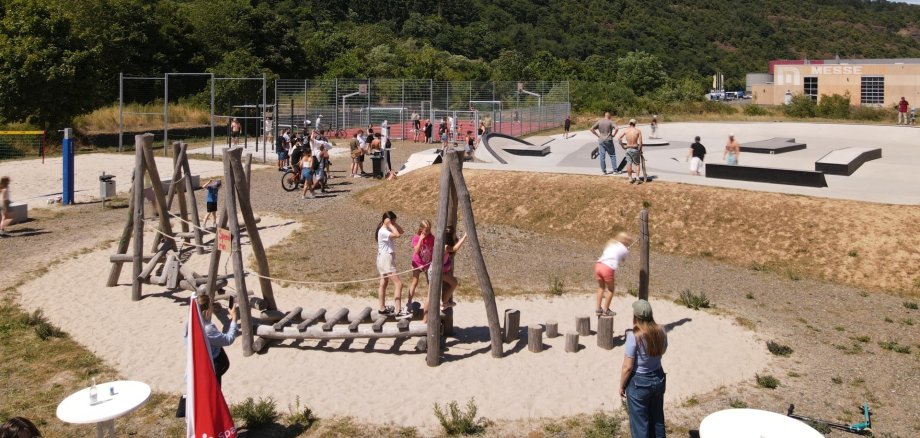
On Friday, March 27, 2026, from 1 p.m. to 6 p.m., the youth work of the Idar-Oberstein City Youth Welfare Office cordially invites you to the big season opening celebration in the city park. Admission is free and all families, children, young people and sports enthusiasts are invited to experience a varied afternoon in the city park. In addition to the skate park, all the other facilities in the city park such as volleyball, soccer, basketball and the fitness equipment can of course also be used. Food and drink will also be provided: there will be freshly grilled food and cool drinks.

A special highlight of the event is the official opening of the sports box in the city park. This is one of two new sports boxes in the city of Idar-Oberstein - the second is located on the outdoor grounds of the Flurschule. As an open, publicly accessible facility, the sports box offers the opportunity to borrow various sports equipment such as fitness and strength equipment as well as equipment for leisure activities. It is conveniently controlled via an app. Use of the Sportbox and app is free of charge. Special thanks go to the Ministry of the Interior and Sport, which has provided extensive funding for the Sportboxes, thereby making an important contribution to promoting health and physical activity in the city.

The youth work team is looking forward to a fun and sporty day in the city park and cordially invites everyone to discover the wide range of leisure activities together.

Help with accessibility

  • General

    We make every effort to ensure that our websites are accessible. You can find details on this in our accessibility statement. You can send us suggestions for improvement using our feedback form.

  • Font size

    To adjust the font size, please use the following key combinations:

    Larger

    ⌘command
    +

    Smaller

    ⌘command

    Larger

    Ctrl
    +

    Smaller

    Ctrl
  • Keyboard navigation

    Use TAB and SHIFT + TAB to navigate through next/previous links, form elements and buttons.

    Use ENTER to open links and interact with elements.

  • Contrast mode

    Press the following key combination to reduce or increase the contrast:

    Enlarge

    ⌃control
    ⌥option
    ⌘command
    .

    Decrease

    ⌃control
    ⌥option
    ⌘command
    ,
    Note: The shortcuts must be activated in the system settings of the operating system.

    Press the left ALT key + left SHIFT key + PRINT to quickly switch the high contrast mode on or off.

  • Invert colors

    Press the following key combination to switch the color inversion on and off:

    ⌃control
    ⌥option
    ⌘command
    8
    Note: The shortcuts must be activated in the system settings of the operating system.

    First activate the screen magnifier and then switch the color inversion on and off with the following key combinations:

    1. screen magnifier

    +

    2. invert colors

    Ctrl
    Old
    I
  • Screen magnifier

    Press the following key combinations to use the screen magnifier:

    Switch on/off

    ⌥option
    ⌘command
    8

    Enlarge view

    ⌥option
    ⌘command
    =

    Reduce view

    ⌥option
    ⌘command
    Note: The shortcuts must be activated in the system settings of the operating system.

    Switch on / Enlarge view

    +

    Reduce view

Select language