

This page has been automatically translated. As a result, there may be discrepancies or inaccuracies in the text. Only the original version is binding. Legal claims arising from the content of the translated version are excluded.

Green space redesigned

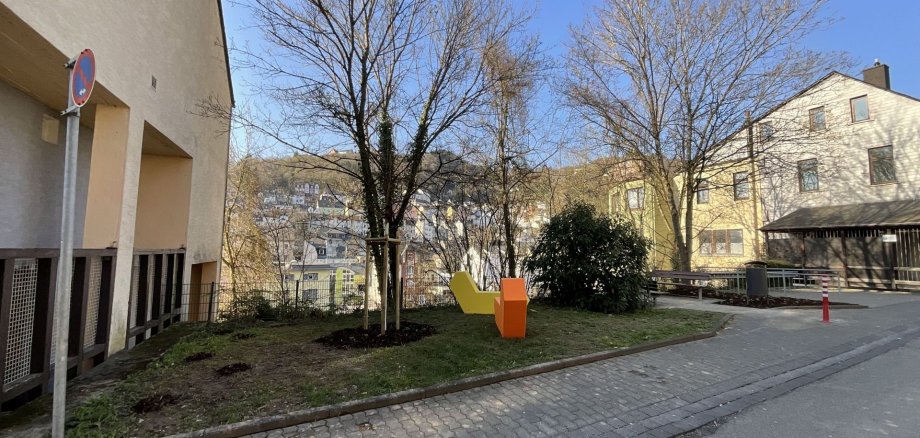
Just in time for the start of spring, the urban green spaces in the Wasenstrasse district are blossoming in new splendor. The first of these was the area by the Alfred Peth Bridge: By removing the ground-covering planting, the area now looks more open and friendly.

Other measures as part of the ongoing urban development program for social cohesion are also contributing to the upgrading. For example, the green spaces at the Amtsstraße/Jahnstraße railroad underpass and at Wasenstraße 41 (next to Gottlieb & Wagner) have been redesigned. The latter now offers additional seating in the shade of a newly planted tree. Surrounded by a flowering meadow with perennials and grasses as well as a variety of new plantings, an attractive place to spend time has been created. Colorful seating blocks - especially for children and young people - complete the offer. The paths have also been repaired to make the area accessible again. In future, the redesigned area will offer space for encounters and neighborly exchange. The aim of the climate-adapted measures is to sustainably improve the quality of life in the neighborhood.

Planning for other urban development projects is progressing, including the redesign of the Flurschule site to create a new district center, with construction work expected to begin in 2027.

Help with accessibility

  • General

    We make every effort to ensure that our websites are accessible. You can find details on this in our accessibility statement. You can send us suggestions for improvement using our feedback form.

  • Font size

    To adjust the font size, please use the following key combinations:

    Larger

    ⌘command
    +

    Smaller

    ⌘command

    Larger

    Ctrl
    +

    Smaller

    Ctrl
  • Keyboard navigation

    Use TAB and SHIFT + TAB to navigate through next/previous links, form elements and buttons.

    Use ENTER to open links and interact with elements.

  • Contrast mode

    Press the following key combination to reduce or increase the contrast:

    Enlarge

    ⌃control
    ⌥option
    ⌘command
    .

    Decrease

    ⌃control
    ⌥option
    ⌘command
    ,
    Note: The shortcuts must be activated in the system settings of the operating system.

    Press the left ALT key + left SHIFT key + PRINT to quickly switch the high contrast mode on or off.

  • Invert colors

    Press the following key combination to switch the color inversion on and off:

    ⌃control
    ⌥option
    ⌘command
    8
    Note: The shortcuts must be activated in the system settings of the operating system.

    First activate the screen magnifier and then switch the color inversion on and off with the following key combinations:

    1. screen magnifier

    +

    2. invert colors

    Ctrl
    Old
    I
  • Screen magnifier

    Press the following key combinations to use the screen magnifier:

    Switch on/off

    ⌥option
    ⌘command
    8

    Enlarge view

    ⌥option
    ⌘command
    =

    Reduce view

    ⌥option
    ⌘command
    Note: The shortcuts must be activated in the system settings of the operating system.

    Switch on / Enlarge view

    +

    Reduce view

Select language