

This page has been automatically translated. As a result, there may be discrepancies or inaccuracies in the text. Only the original version is binding. Legal claims arising from the content of the translated version are excluded.

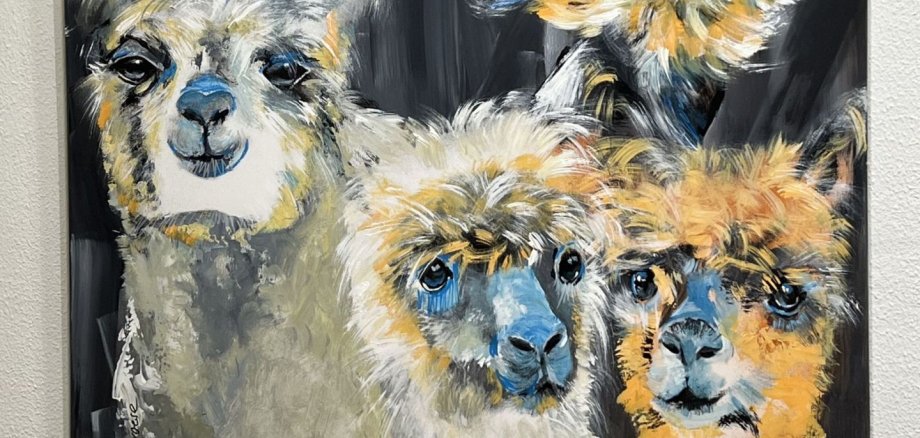
Pictures in bright colors with lots of power and energy

Until February 25, 2026, the city administration of Idar-Oberstein is showing works by Swiss artist Carmen Heidi Kroese in the foyer of the town hall. The exhibition features more than 20 large-format works in oil, acrylic and mixed media, which impress with their intense colors and great power and energy.

Carmen Kroese has lived and worked in Idar-Oberstein since 2019 and is an active member of the Kunstverein Obere Nahe. Her paintings move between figurative representation and abstraction and address both the beauty of nature and global challenges such as environmental destruction, war and human suffering. Despite the serious content, her works are characterized by optimism, joie de vivre and a positive attitude. The multiple award-winning artist - including "Artist of the Year 2022" in an international competition in the USA - is represented internationally. Her works can be found in public and private collections in Europe and the United States.

- The exhibition can be viewed until February 25, 2026, Monday to Wednesday from 7 a.m. to 4 p.m., Thursday from 7 a.m. to 6 p.m. and Friday from 7 a.m. to 12 p.m. in the foyer of the city administration (Georg-Maus-Straße 1).

Help with accessibility

  • General

    We make every effort to ensure that our websites are accessible. You can find details on this in our accessibility statement. You can send us suggestions for improvement using our feedback form.

  • Font size

    To adjust the font size, please use the following key combinations:

    Larger

    ⌘command
    +

    Smaller

    ⌘command

    Larger

    Ctrl
    +

    Smaller

    Ctrl
  • Keyboard navigation

    Use TAB and SHIFT + TAB to navigate through next/previous links, form elements and buttons.

    Use ENTER to open links and interact with elements.

  • Contrast mode

    Press the following key combination to reduce or increase the contrast:

    Enlarge

    ⌃control
    ⌥option
    ⌘command
    .

    Decrease

    ⌃control
    ⌥option
    ⌘command
    ,
    Note: The shortcuts must be activated in the system settings of the operating system.

    Press the left ALT key + left SHIFT key + PRINT to quickly switch the high contrast mode on or off.

  • Invert colors

    Press the following key combination to switch the color inversion on and off:

    ⌃control
    ⌥option
    ⌘command
    8
    Note: The shortcuts must be activated in the system settings of the operating system.

    First activate the screen magnifier and then switch the color inversion on and off with the following key combinations:

    1. screen magnifier

    +

    2. invert colors

    Ctrl
    Old
    I
  • Screen magnifier

    Press the following key combinations to use the screen magnifier:

    Switch on/off

    ⌥option
    ⌘command
    8

    Enlarge view

    ⌥option
    ⌘command
    =

    Reduce view

    ⌥option
    ⌘command
    Note: The shortcuts must be activated in the system settings of the operating system.

    Switch on / Enlarge view

    +

    Reduce view

Select language