

This page has been automatically translated. As a result, there may be discrepancies or inaccuracies in the text. Only the original version is binding. Legal claims arising from the content of the translated version are excluded.

Two new quiet park areas created

The cemetery administration has announced that urn burials are now possible in a resting place at two further municipal cemeteries in Idar-Oberstein. With immediate effect, burials can also take place in a resting place at the old Nahbollenbach cemetery and the cemetery in Kirchenbollenbach. These urn graves, which are laid out on a meadow, are only provided with a grave slab and therefore do not require any further maintenance for relatives. As a result, rest areas have now been created at eleven municipal cemeteries. Only the cemeteries in Mittelbollenbach, the central cemetery in Idar and the forest cemetery in Nahbollenbach do not yet have such areas. A quiet park is being planned for the cemetery in Georg-Weierbach.

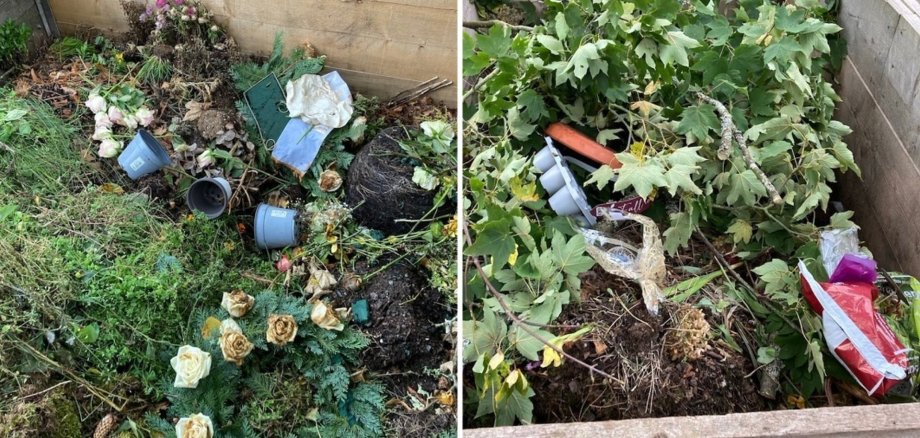
However, the cemetery administration must also draw attention to a widespread problem. Time and again, the bins for green waste and residual waste set up in the cemeteries are not filled correctly. Unfortunately, material that cannot be shredded and processed into compost, such as funeral wreaths with bows, moss or similar, is often disposed of in the green waste bins. These are plastics that do not belong in the green waste box, but in the residual waste. The companies where the cemetery administration disposes of the green waste have already complained massively about these incorrect fillings. If the green waste continues to be contaminated with such quantities of plastic, they want to prohibit further deliveries. The cemetery administration is therefore appealing to cemetery users to separate their waste carefully so that it can continue to be disposed of properly.

Help with accessibility

  • General

    We make every effort to ensure that our websites are accessible. You can find details on this in our accessibility statement. You can send us suggestions for improvement using our feedback form.

  • Font size

    To adjust the font size, please use the following key combinations:

    Larger

    ⌘command
    +

    Smaller

    ⌘command

    Larger

    Ctrl
    +

    Smaller

    Ctrl
  • Keyboard navigation

    Use TAB and SHIFT + TAB to navigate through next/previous links, form elements and buttons.

    Use ENTER to open links and interact with elements.

  • Contrast mode

    Press the following key combination to reduce or increase the contrast:

    Enlarge

    ⌃control
    ⌥option
    ⌘command
    .

    Decrease

    ⌃control
    ⌥option
    ⌘command
    ,
    Note: The shortcuts must be activated in the system settings of the operating system.

    Press the left ALT key + left SHIFT key + PRINT to quickly switch the high contrast mode on or off.

  • Invert colors

    Press the following key combination to switch the color inversion on and off:

    ⌃control
    ⌥option
    ⌘command
    8
    Note: The shortcuts must be activated in the system settings of the operating system.

    First activate the screen magnifier and then switch the color inversion on and off with the following key combinations:

    1. screen magnifier

    +

    2. invert colors

    Ctrl
    Old
    I
  • Screen magnifier

    Press the following key combinations to use the screen magnifier:

    Switch on/off

    ⌥option
    ⌘command
    8

    Enlarge view

    ⌥option
    ⌘command
    =

    Reduce view

    ⌥option
    ⌘command
    Note: The shortcuts must be activated in the system settings of the operating system.

    Switch on / Enlarge view

    +

    Reduce view

Select language