

This page has been automatically translated. As a result, there may be discrepancies or inaccuracies in the text. Only the original version is binding. Legal claims arising from the content of the translated version are excluded.

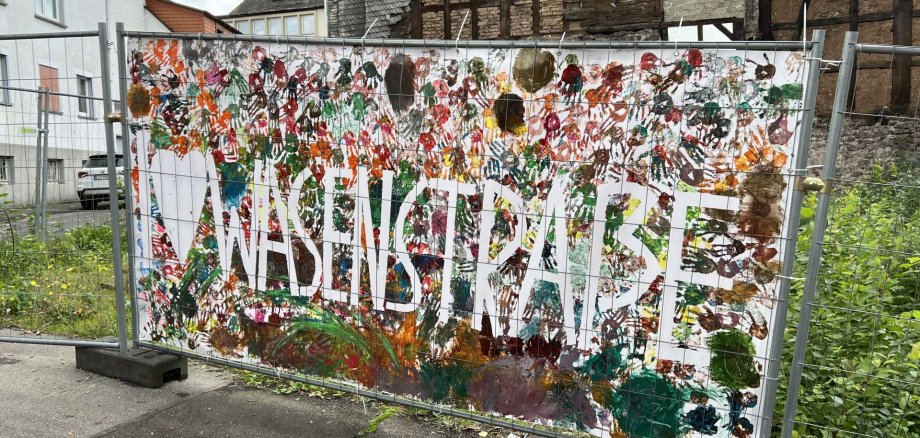
Kita children from St. Walburga create a colorful banner

As part of the autumn holiday programme in the Wasenstraße district, the neighbourhood management organized a creative project in collaboration with the St. Walburga daycare centre, in which the children designed a colourful banner. Under the motto "For more color & cohesion in the neighborhood", the daycare children gave free rein to their creativity and love of color. The resulting banner has now been attached to a nearby construction fence in Ritterstraße by the organizers together with some of the daycare children. The main aim of the campaign was to bring more color to the neighborhood for all residents. The children were not only involved in the design, but also in hanging up the banner with great joy and enthusiasm.

The entire autumn holiday programme was organized by the neighbourhood management team led by Lara Paulus and supported by TV-Oberstein, the St. Walburga daycare centre and the new migration social worker at the DRK, Monique Großmann. The open games meeting and a creative workshop with handicraft activities were once again on offer under the motto "Turning old things into beautiful", where the children were able to create something new from old things. The children took part in all the activities with great enthusiasm.

Preparations will soon begin for the winter market, which will take place at the beginning of December in the parish hall of St. Walburga's Catholic Church. More information will follow soon.

Help with accessibility

  • General

    We make every effort to ensure that our websites are accessible. You can find details on this in our accessibility statement. You can send us suggestions for improvement using our feedback form.

  • Font size

    To adjust the font size, please use the following key combinations:

    Larger

    ⌘command
    +

    Smaller

    ⌘command

    Larger

    Ctrl
    +

    Smaller

    Ctrl
  • Keyboard navigation

    Use TAB and SHIFT + TAB to navigate through next/previous links, form elements and buttons.

    Use ENTER to open links and interact with elements.

  • Contrast mode

    Press the following key combination to reduce or increase the contrast:

    Enlarge

    ⌃control
    ⌥option
    ⌘command
    .

    Decrease

    ⌃control
    ⌥option
    ⌘command
    ,
    Note: The shortcuts must be activated in the system settings of the operating system.

    Press the left ALT key + left SHIFT key + PRINT to quickly switch the high contrast mode on or off.

  • Invert colors

    Press the following key combination to switch the color inversion on and off:

    ⌃control
    ⌥option
    ⌘command
    8
    Note: The shortcuts must be activated in the system settings of the operating system.

    First activate the screen magnifier and then switch the color inversion on and off with the following key combinations:

    1. screen magnifier

    +

    2. invert colors

    Ctrl
    Old
    I
  • Screen magnifier

    Press the following key combinations to use the screen magnifier:

    Switch on/off

    ⌥option
    ⌘command
    8

    Enlarge view

    ⌥option
    ⌘command
    =

    Reduce view

    ⌥option
    ⌘command
    Note: The shortcuts must be activated in the system settings of the operating system.

    Switch on / Enlarge view

    +

    Reduce view

Select language