

This page has been automatically translated. As a result, there may be discrepancies or inaccuracies in the text. Only the original version is binding. Legal claims arising from the content of the translated version are excluded.

Do not remove Hercules shrubs yourself

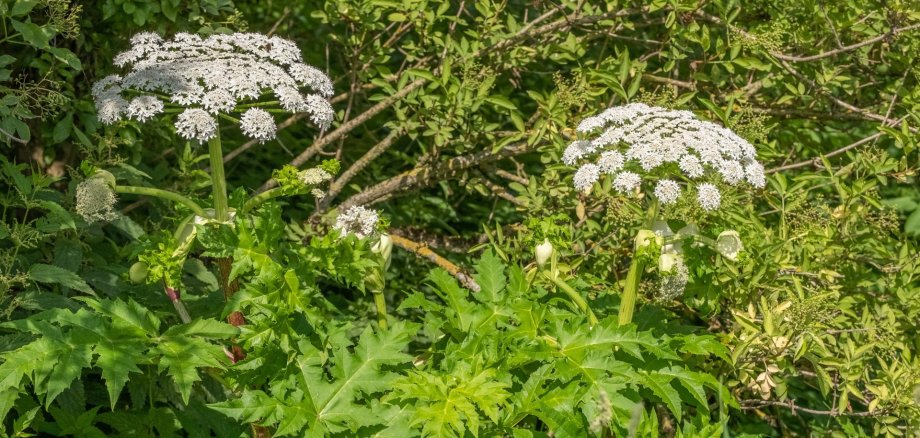
This year, there are again isolated locations of the Hercules perennial (also known as giant hogweed) along the Nahe and its tributaries - including in Idar-Oberstein. The municipal civil engineering department points out that these occurrences should not - as has already happened - be removed independently out of good intentions. Instead, the city administration should be informed of any findings.

Herbaceous perennial is an invasive plant species with enormous potential to spread. In addition, contact with the plants can pose a serious health risk to humans. The sap of the Hercules perennial is poisonous and can react aggressively on the skin when exposed to sunlight, causing burn-like injuries. For this reason, and due to the fact that Herculean perennial can displace the natural plant communities in the water meadows, it is undesirable and must be combated.

Anyone who discovers a Hercules perennial should keep their distance and not remove the plant themselves. This is for your own safety. In the event of a sighting, please inform the municipal civil engineering department immediately, which will then arrange for professional removal.

  • Sightings of Hercules shrubs can be reported to the city council's civil engineering department by calling 06781/64-6612 or e-mailing tiefbau@idar-oberstein.de.

Help with accessibility

  • General

    We make every effort to ensure that our websites are accessible. You can find details on this in our accessibility statement. You can send us suggestions for improvement using our feedback form.

  • Font size

    To adjust the font size, please use the following key combinations:

    Larger

    ⌘command
    +

    Smaller

    ⌘command

    Larger

    Ctrl
    +

    Smaller

    Ctrl
  • Keyboard navigation

    Use TAB and SHIFT + TAB to navigate through next/previous links, form elements and buttons.

    Use ENTER to open links and interact with elements.

  • Contrast mode

    Press the following key combination to reduce or increase the contrast:

    Enlarge

    ⌃control
    ⌥option
    ⌘command
    .

    Decrease

    ⌃control
    ⌥option
    ⌘command
    ,
    Note: The shortcuts must be activated in the system settings of the operating system.

    Press the left ALT key + left SHIFT key + PRINT to quickly switch the high contrast mode on or off.

  • Invert colors

    Press the following key combination to switch the color inversion on and off:

    ⌃control
    ⌥option
    ⌘command
    8
    Note: The shortcuts must be activated in the system settings of the operating system.

    First activate the screen magnifier and then switch the color inversion on and off with the following key combinations:

    1. screen magnifier

    +

    2. invert colors

    Ctrl
    Old
    I
  • Screen magnifier

    Press the following key combinations to use the screen magnifier:

    Switch on/off

    ⌥option
    ⌘command
    8

    Enlarge view

    ⌥option
    ⌘command
    =

    Reduce view

    ⌥option
    ⌘command
    Note: The shortcuts must be activated in the system settings of the operating system.

    Switch on / Enlarge view

    +

    Reduce view

Select language