
Skating into the evening
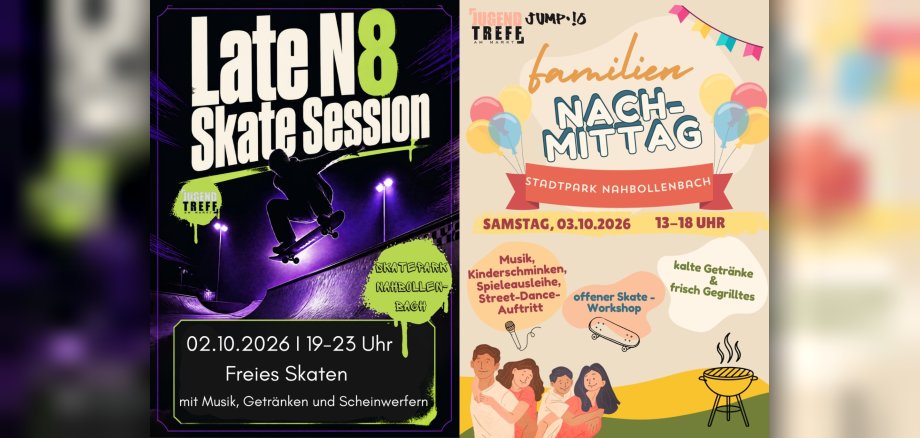
Just because the days are getting shorter and it gets dark earlier outside doesn’t mean the skating season has to be over just yet. On Friday, October 2, 2026, from 7 p.m. to 11 p.m., the skate park in Stadtpark will therefore become a special evening destination. In the area illuminated by floodlights and spotlights, skaters will have the opportunity to stay active even in the evening hours and enjoy the skate park in a special atmosphere. All skate enthusiasts and anyone interested are cordially invited to stop by, bring friends, and enjoy a special evening of skating together.
We’ve also got the perfect musical accompaniment lined up. A playlist will set the mood throughout the evening and can be supplemented with song requests from visitors. This will create a varied soundtrack for our group skate session. Refreshments will also be available: cold drinks can be purchased on-site for a small fee.
Family Day at City Park
On Saturday, October 3, 2026, from 1:00 p.m. to 6:00 p.m., the City Park will be all about family. With a varied program, the event invites children, teens, parents, and friends to spend a wonderful day together at the park.
From 1:00 p.m. to 4:00 p.m., face painting will provide creative entertainment for our youngest visitors. Whether it’s a unicorn, a butterfly, or another favorite character—there are no limits to the imagination. Those who enjoy playing together can take advantage of the game rental service throughout the event. A variety of games invite you to actively explore the park and enjoy a fun-filled time with family and friends.
There’s also an open skate workshop for all skate enthusiasts ages eight and up. Experienced skaters will be on hand to offer tips, assistance, and practical advice. Both beginners and experienced skaters can try out new tricks and improve their skills.
A special highlight awaits visitors on stage: The street dance group “9to5” will perform their choreographed routine in front of a live audience for the first time. For the group, this event marks a debut that both the organizers and the audience have much to look forward to.
Refreshments will also be provided. In addition to grilled food and cold drinks, there will be plenty of opportunity to chat with one another and wind down the day in a relaxed atmosphere.